Java Primitives versus Objects
Java Type System
Java has a two-fold type system consisting of primitives such as int, boolean and reference types such as Integer, Boolean. Every primitive type corresponds to a reference type.
Every object contains a single value of the corresponding primitive type. The wrapper classes are immutable (so that their state can’t change once the object is constructed) and are final (so that we can’t inherit from them).
Under the hood, Java performs a conversion between the primitive and reference types if an actual type is different from the declared one:
Integer j = 1; // autoboxing int i = new Integer(1); // unboxing
The process of converting a primitive type to a reference one is called autoboxing, the opposite process is called unboxing.
Pros and Cons
The decision what object is to be used is based on what application performance we try to achieve, how much available memory we have, the amount of available memory and what default values we should handle.
Single Item Memory Footprint
The primitive type variables have the following impact on the memory:
- boolean – 1 bit
- byte – 8 bits
- short, char – 16 bits
- int, float – 32 bits
- long, double – 64 bits
the reference type variables have the following impact on the memory:
- Boolean – 128 bits
- Byte – 128 bits
- Short, Character – 128 bits
- Integer, Float – 128 bits
- Long, Double – 192 bits
Memory Footprint for Arrays
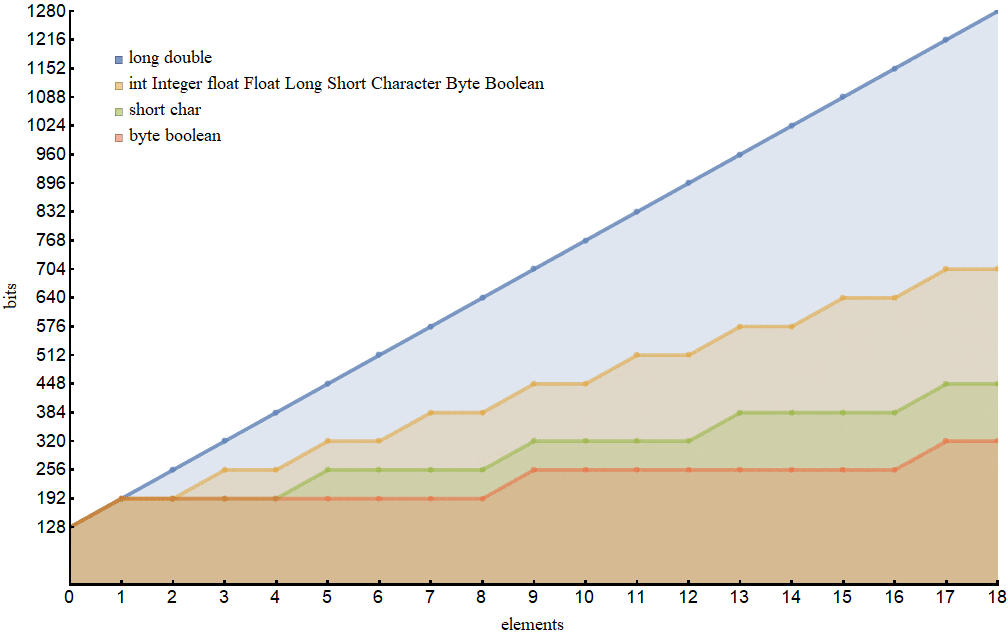
single-element arrays of primitive types are almost always more expensive (except for long and double) than the corresponding reference type.
Performance
it’s required more time to perform the operation for wrapper classes.
Note that the primitive types live in the stackwhile the reference types live in the heap. This is a dominant factor that determines how fast the objects get be accessed.
Default Values
Default values of the primitive types:
- numeric types are 0.
- boolean type is false.
- char type is \u0000.
- wrapper classes is null.
while the reference types might acquire a value (null) that in some sense doesn’t belong to their domains.
Though it isn’t considered a good practice to leave variables uninitialized.
In such a situation, when a primitive type variable has a value that is equal to its type default one, we should find out whether the variable has been really initialized.
There’s no such a problem with a wrapper class variables since the null value is quite an evident indication that the variable hasn’t been initialized.
Usage
The primitive types are much faster and require much less memory. Therefore, we might want to prefer using them.
When our application needs collections with a big number of elements, we should consider using arrays with as more “economical” type as possible.
Exceptions in Java
What Is an Exception?
An exception is an event, which occurs during the execution of a program, that disrupts the normal flow of the program’s instructions.
The call stack :
- an error occurs within a method
- the method creates an object and hands it off to the runtime system.
-
The object, called an exception object, contains information about the error, including its type and the state of the program when the error occurred. Creating an exception object and handing it to the runtime system is called **throwing an exception.**
- After a method throws an exception, the runtime system attempts to find something to handle it. The set of possible “somethings” to handle the exception is the ordered list of methods that had been called to get to the method where the error occurred.
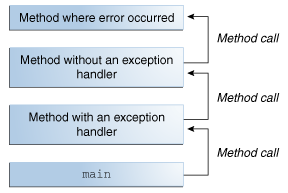
Searching the call stack for the exception handler.
Exception handler: a method that contain a block of code that can handle the exception.
- The search of Exception handler begins with the method in which the error occurred and proceeds through the call stack in the reverse order in which the methods were called.
- When an appropriate handler is found, the runtime system passes the exception to the handler. An exception handler is considered appropriate if the type of the exception object thrown matches the type that can be handled by the handler.
The exception handler chosen is said to catch the exception. If the runtime system exhaustively searches all the methods on the call stack without finding an appropriate exception handler, the runtime system (and, consequently, the program) terminates.
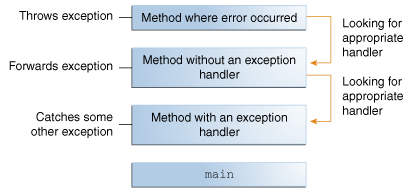
The Catch or Specify Requirement
Valid Java programming language code must honor the Catch or Specify Requirement. This means that code that might throw certain exceptions must be enclosed by either of the following:
- A try statement that catches the exception. The try must provide a handler for the exception, as described in Catching and Handling Exceptions.
- A method that specifies that it can throw the exception. The method must provide a throws clause that lists the exception, as described in Specifying the Exceptions Thrown by a Method.
The Three Kinds of Exceptions
- The first kind of exception is the checked exception.
- The second kind of exception is the error.
- The third kind of exception is the runtime exception.
How to Throw Exceptions ?
using The throw Statement.
The throw Statement
All methods use the throw statement to throw an exception.The throw statement requires a single argument: a throwable object. Throwable objects are instances of any subclass of the Throwable class. Here’s an example of a throw statement.
throw **someThrowableObject**;
Throwable Class and Its Subclasses
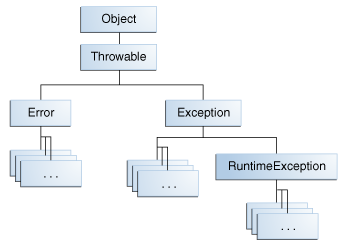
- Error Class
- Exception Class
Using Scanner to read in a file in Java
Objects of type Scanner are useful for breaking down formatted input into tokens and translating individual tokens according to their data type.
Breaking Input into Tokens
By default, a scanner uses white space to separate tokens. (White space characters include blanks, tabs, and line terminators.
The ScanXan example treats all input tokens as simple String values. Scanner also supports tokens for all of the Java language’s primitive types (except for char), as well as BigInteger and BigDecimal. Also, numeric values can use thousands separators. Thus, in a US locale, Scanner correctly reads the string “32,767” as representing an integer value.