Classes and Object
what is classes ?
In object-oriented terms, we say that your bicycle is an instance of the class of objects known as bicycles. A class is the blueprint from which one object are created.
what is objects ?
- objects in real world is something that has state and behaviour, which is similar to the software objects that store feilds (state), and methods(behaviour).and it has some primiry important things to do but it remains in control of how the outside world is allowed to use it.
- Methods operate on an object’s internal state and serve as the primary mechanism for object-to-object communication.
Bundling code into individual software objects provides a number of benefits, including:
- Modularity: The source code for an object can be written and maintained independently of the source code for other objects. Once created, an object can be easily passed around inside the system.
- Information-hiding: By interacting only with an object’s methods, the details of its internal implementation remain hidden from the outside world.
- Code re-use: If an object already exists (perhaps written by another software developer), you can use that object in your program. This allows specialists to implement/test/debug complex, task-specific objects, which you can then trust to run in your own code.
- Pluggability and debugging ease: If a particular object turns out to be problematic, you can simply remove it from your application and plug in a different object as its replacement. This is analogous to fixing mechanical problems in the real world. If a bolt breaks, you replace it, not the entire machine.
Binary, Decimal and Hexadecimal Numbers
Decimal
Every digit in a decimal number has a “position”, and the decimal point helps us to know which position is which:
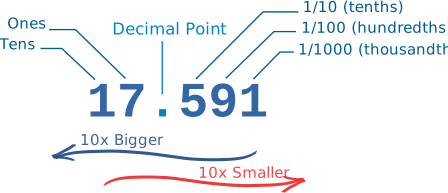
Bases
The Decimal Number System is also called “Base 10”, because it is based on the number 10. while there’s no 10, it starts from 0,1,2,3,4,5,6,7,8,9
Counting with Different Number Systems
use 2 (“Binary”), 16 (“Hexadecimal”),
Binary Numbers
Binary Numbers are just “Base 2” instead of “Base 10”. So you start counting at 0, then 1, then you run out of digits … so you start back at 0 again, but increase the number on the left by 1.
.png)
Hexadecimal Numbers
They look the same as the decimal numbers up to 9, but then there are the letters (“A’,”B”,”C”,”D”,”E”,”F”) in place of the decimal numbers 10 to 15.